
8.9.25
Streamlined global invoicing for modern companies
Managing business travel across multiple countries comes with its own financial complexities especially when dealing with various currencies. BizAway’s Multi-Currency feature is designed to solve exactly that.
With this enhancement, global companies can now receive invoices, credit notes, and refunds in currencies other than Euro (€), ensuring a smoother financial experience aligned with their local accounting requirements.
The main goal of this feature is to make expense reconciliation significantly easier for our customers.
A Smarter way to handle exchange rates
To guarantee accuracy and internal consistency, BizAway applies a transparent and controlled exchange-rate mechanism.
Our system automatically samples exchange rates once per day for all supported currencies, ensuring that we always rely on up-to-date financial data.
The value that we want to transmit to our customers is very clear: the price you see, it’s the price you pay.
It’s important to know that when a booking reaches the confirmed status, the exchange rate used at that moment is frozen and stored in our database.
From that point on, this fixed rate is applied across the entire lifecycle of the booking from what users see in the Platform to the final invoice. This means no fluctuations, no ambiguity, and full clarity for both travelers and finance teams.
Supported currencies
The Multi-Currency feature currently supports a wide and growing list of currencies:
- AED – Emirati Dirham
- AUD – Australian Dollar
- CAD – Canadian Dollar
- CHF – Swiss Franc
- CZK – Czech Koruna
- DKK – Danish Krone
- GBP – British Pound
- JPY – Japanese Yen
- NOK – Norwegian Krone
- PLN – Polish Zloty
- RON – Romanian Leu
- SAR – Saudi Riyal
- SEK – Swedish Krona
- USD – US Dollar
If a client needs a currency not yet enabled in their configuration, we are working closely with the Finance Team to build a more complete list and deliver an even better experience for our clients.
Clear and consistent experience on the platform
To provide an intuitive user experience while maintaining accounting accuracy, the Platform now distinguishes between two levels of currency settings:
- Visualization Currency — Personal Display Preference Each user can select a preferred visualization currency within their profile settings. This affects only how prices are displayed in the interface, helping users easily understand costs in the currency they are most familiar with.
- Account Currency — The Company’s Financial Backbone
This is the official currency used for:
- All company purchases
- Payment flows
- Invoice issuance
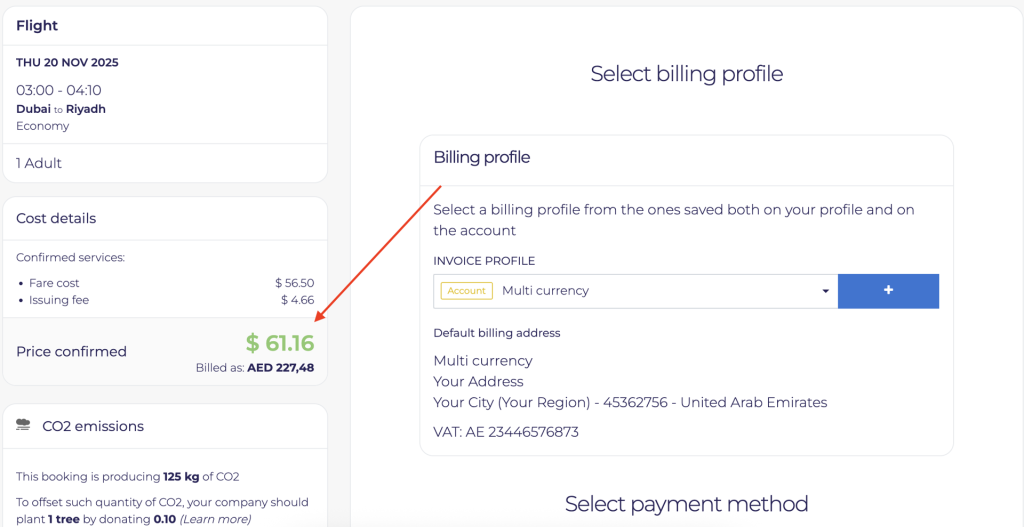
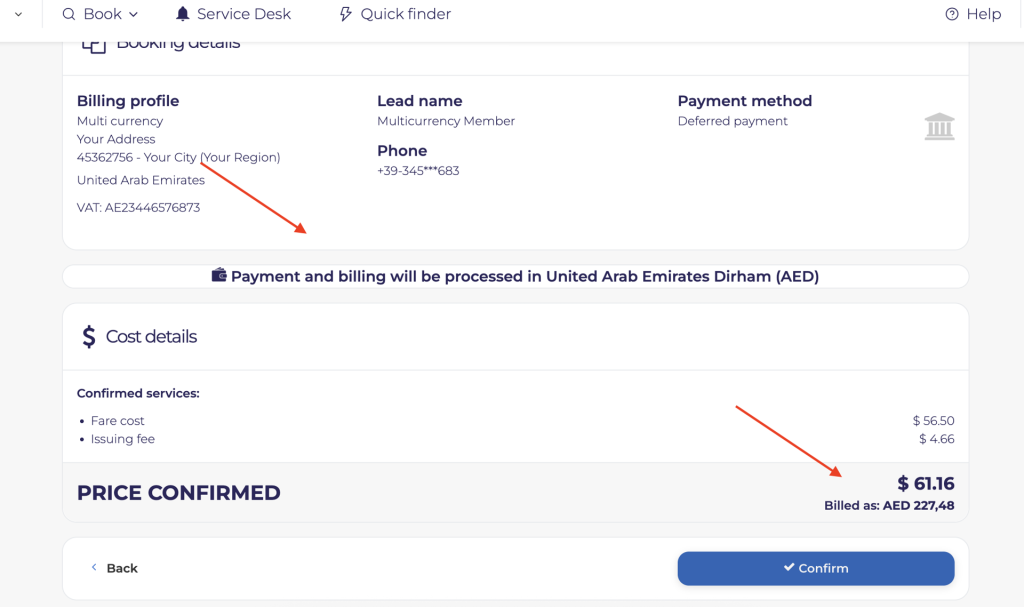
The account currency reflects the company’s financial framework and ensures standardization across all departments and accurate reconciliation. If a user’s visualization currency differs from their company’s account currency, the system automatically notifies them during checkout. This prevents confusion and guarantees transparency throughout the booking and billing process.
A practical example
Consider a company with USD as its account currency:
- An employee, however, prefers to see prices in GBP and sets this as their visualization currency.
- While browsing the Platform, all prices appear in GBP.
- At checkout, a notice informs the user that the invoice will be issued in USD, the company’s account currency.
- Once the booking is confirmed, the exchange rate against USD is frozen, ensuring stable and predictable invoicing.
Built for global operations
BizAway’s Multi-Currency feature empowers companies operating across borders with:
- Localized invoicing
- Predictable and transparent financial processes
- Consistent exchange-rate management
- Better user experience across diverse teams
This enhancement reinforces our mission to simplify business travel through smart, intuitive, and globally scalable solutions. If your company is interested in enabling Multi-Currency or exploring other advanced financial features, a BizAway Representative is here to support you.
Table of contents
Ben je benieuwd hoe BizAway jouw bedrijf kan helpen?
Spreek met een BizAway-expert en ontdek hoe ons platform jouw zakelijke reizen eenvoudiger, voordeliger en stressvrij maakt.